วันอังคารที่ 3 พฤษภาคม พ.ศ. 2554

Review: Pioneer DDJ-S1

Review: Pioneer DDJ-S1


Pioneer’s 2011 products have definitely had an ‘if you can’t beat them, join them’ bent, and feature much improved integration with DJ software. The announcement of the DDJ series surprised many with two different products, one for Native Instruments’ Traktor and the other for Serato’s Itch – with the Itch focused DDJ-S1 on the bench, we dig in and find out whether Pioneer can transfer their hardware calibre to the controller realm.
Product Reviewed: Pioneer DDJ-S1
Price: $1599/£1099
Available: Now
Included software: Serato ITCH
External dimensions: 26.8 in (W) x 3.7 in (H) x 12.5 in (D)
Weight: 11lbs
THE GOOD

  • Itch integration provides hassle free plug-and-go play
  • ‘Slip mode’ has some great uses
  • Nifty laptop incorporating design

THE BAD

  • At £1099, it’s expensive
  • No opportunity to add extra controllers to the setup

THE BOTTOM LINE

If you love Serato software design (especially considering this autumn’s Itch 2 release which will bring it much more into line with Scratch Live) and Pioneer product design, the DDJ-S1 is going to be right up your street. Pioneer have put a lot of thought into how to take ‘classic’ two channel DJing and completely focus the user experience on the controller.

HANDS ON CONTROL


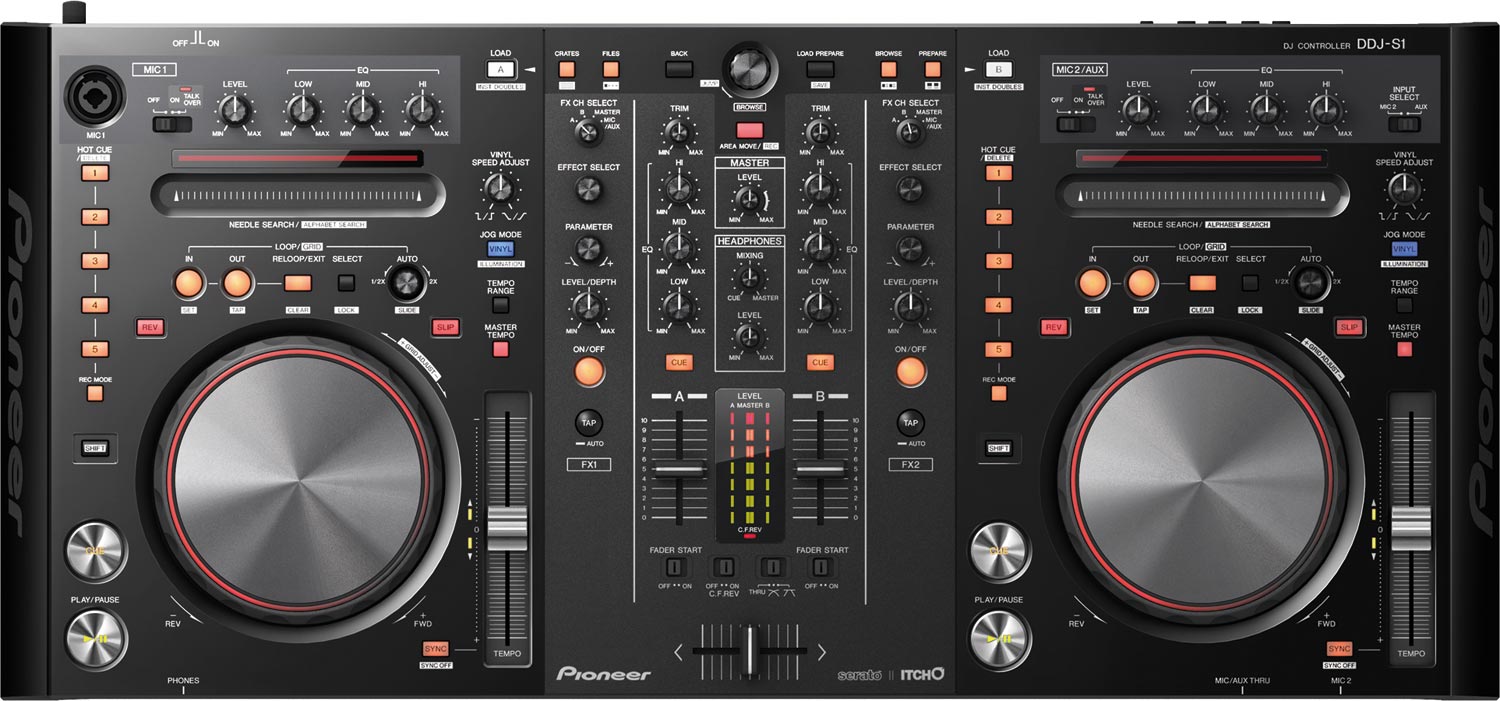
Big, but light, the S1 has the same sort of plasticy feel that the midrange CDJs have – initially a little disheartening but ultimately very sturdy despite the ever so slightly ‘hollow’ feel. The jog wheels feel like CDJ400s and have a nice light that rotates around the edge of the CD sized platter to aid positioning, the lightweight pitch fader will be familiar to a CDJ user and feels the same resolution, and the faders are similar to most DJM mixers – a fairly light crossfader and slightly stiff upfaders.
The size of the S1 has allowed sound ergonomic placement of the effects, cue and loop controls, and they feel good to the touch. Pioneer haven’t shifted much from their design blueprint, and whilst things like the play and cue buttons are a bit smaller than the one on their biggest CDJs they feel much the same; cue buttons and effects knobs offer lightweight clicks and rotation, respectively. The clever raising of the S1 on its underside provides a perfect place to slip your laptop’s keyboard, just leaving the screen on show and strengthening the illusion that the controller is the power house.

Two things that controller users frequently revert to keyboard and mouse for, library searching and finding a specific position in a song, have been thought about by Pioneer too; the S1 features a Needle Drop ribbon strip, which instantly seeks the position on the track on deck and doubles up as an alphabetical search shortcut for your track library in shift mode.

BORN SLIPPY


Slip mode, a popular feature on Pioneer’s CDJ900, has made its way into the S1 version of Itch. Slip mode is essentially the logical extension of the idea behind roll; any manipulation to the deck’s playhead while slipmode is engaged creates a Donny Darko-esque tangent whereby time and space are meshed and melded freely up until the inevitable moment when the sound must return to the ‘real world’. Spin back the platter and you’ll get a rewind, but rather than picking up x bars previous, at the end of the spinback the track will return to where it would have been if you’d never touched the platter. It’s a really elegant implementation of effects modifiers; loops become loop roll effects, deck reverse turns into censor mode, and cues can be used as pseudo sample banks.

HARD AND SOFT


Of course, the S1 relies on Itch to create the noises that will emanate from your speakers, but it does have an integrated audio interface and some hard wired function – the mic/aux has dedicated hardware EQ and an emergency straight to master passthrough. Quality is good – nothing particularly jaw dropping, perhaps, but it’s loud and crisp and it has decent headroom on its aux inputs. Aux and mic inputs can also be routed through Itch’s effects. Itch is largely the same across its incarnations in different packs, so it’s somewhat academic to go too far into Itch – this is, afterall, a DDJ-S1 review. It’s worth mentioning that the S1 Itch is pretty fully featured, though, with beat gridding, two effects banks, and a full complement of low/high pass filters, beat crusher, flanger, phaser, delay, echo, reverb, tremolo, repeater, brake and reverse, and the S1 handles the 1:1 mapping of Itch’s features – like instant doubles – with panache.

One of Itch’s biggest shortcomings, which transfers to the S1, is its closed off nature. Despite the total 1:1 mapping of controls, certain things like cue point juggles are less intuitive on the S1’s cue buttons than a pad or button controller, and ideas like our super combo mapping principle are a no go. It’s for this reason that the DDJ-S1 is best thought of as an excellent solution for DJs who want to emulate the functionality of a two CDJ and mixer setup with a light, all in one controller solution, rather than an experimental controllerist’s wet dream.
Check out our announcement of these new Pioneer controllers to take a look at the Traktor controlling DDJ-T1 and how it compares!

The Search for the ultimate Turntable Surrogate (By Dj Solomon)

For Serato Scratch Live DJ’s looking for a turntable alternative, we asked DJ Solomon, a Serato roster DJ and Golden State Warriors resident, to try out the DDJ-S1 for a month. Here are his thoughts.
When I first heard about Serato’s program to launch their Itch platform a few years back, I was overjoyed. Finally, a way to play gigs using Serato software without lugging turntables around. While most of my gigs are in Nightclubs where 2 technics 1200s are the norm, private events where I’m responsible for providing the equipment are a regular occurance.  Anyone who has ever lugged a pair of 1200s in flight cases knows that the frustrating process is just not worth the hassle for your average wedding.
Enter the Vestax VCI-300, the 1st real attempt at a portable mobile solution for Serato users.  In my 1 year plus tenure with the VCI-300 as my preferred controller,  it has completed the task at hand but left me yearning for the next big thing, which seems to have just arrived in a shiny new Pioneer DJ box.
Here are the good parts:
  • Just the Right Size
While I do love the compact package of the VCI-300, it almost appears toy-like. When booking high end corporate events, I often feel like my professional DJ equipment should be large enough to look “professional”. The other Itch controller offerings I’ve demoed to this point are either too large, too heavy or generally too awkward a form/package to easily move around (NS7). The DDJ-S1 seems just right. Easy enough to move, yet from afar, its appears to mean business.
  • Proper Headphone Cue
The headphone cue on the VCI 300 was as basic as possible, while the DDJ-S1 has an almost identical system to its every popular DJM-800 cousin which is arguably the worldwide standard for club mixers.  This similarity makes headphone cuing a snap when coming from the DJM-800.
  • Proper Power Supply
The Pioneer is basically a powered mixer that can be run completely independently with both 2 external mic inputs and a 2nd “Aux in” which can be operated without a computer running. Very convenient if you have a scenario where you need music playing but dont want to leave your computer running.
  • Nice Control Layout
The DDJ-S1 doesn’t have EVERYTHING you may want in a turntable replacement but it’s a whole lot closer.  The jog wheels are quite a bit more expressive than the VCI-300 and boast a chase light that is the equivalent to the sticker on a record, which allows the user to juggle songs without looking at the screen.  It also sports five cue buttons as well as a complex array of looping controls. Also worth noting is the ribbon control that helps the user quickly scan through songs.
I also found some significant inadequacies:
  • The looping is complex and based on the CDJ
I understand that one of the goals of this controller is to lure CDJ users over to the Itch platform, however if you are used to the “scratch live” way of doing things then this might not be a welcome change.
  • Vinyl “start/stop” adjust is a single control knob
The standard setting for this control should be to be set to an instant start and a slightly delayed stop (to simulate the stop button on a technics 1200 turntable). This is achievable on the VCI-300 as it is an internal control, as well as on the CDJ as there are two separate knobs for “start” and “stop”, but in this case, I see no way to have an instant “start” and a delayed “stop”, arguably a HUGE design flaw (which I hope can be remedied in a software fix).
  • Sync button issues
The Sync button is in a very vulnerable position that begs to be miss-triggered. When resting my palm on the device to ride the tempo slider, I found myself dangerously close to pushing that button which could cause the songs to jump out of sync. When “instant doubles” is used, both “sync” buttons are activated, which is fine for playing doubles, however when the next song is loaded, “sync” remains active. This makes for one extra step to deactivate the “sync” every time a song is doubled.
I can safely say that this is not quite the “perfect” turntable surrogate, but it’s getting much closer. Since Pioneer seemed to pretty much nail the footprint and basic hardware controls, it seems that with some tweaking to the software most of the shortcomings can be resolved. Grade: A-. Nice work Pioneer!

ReLoop Jockey 3 Reviewed

ReLoop Jockey 3 Reviewed

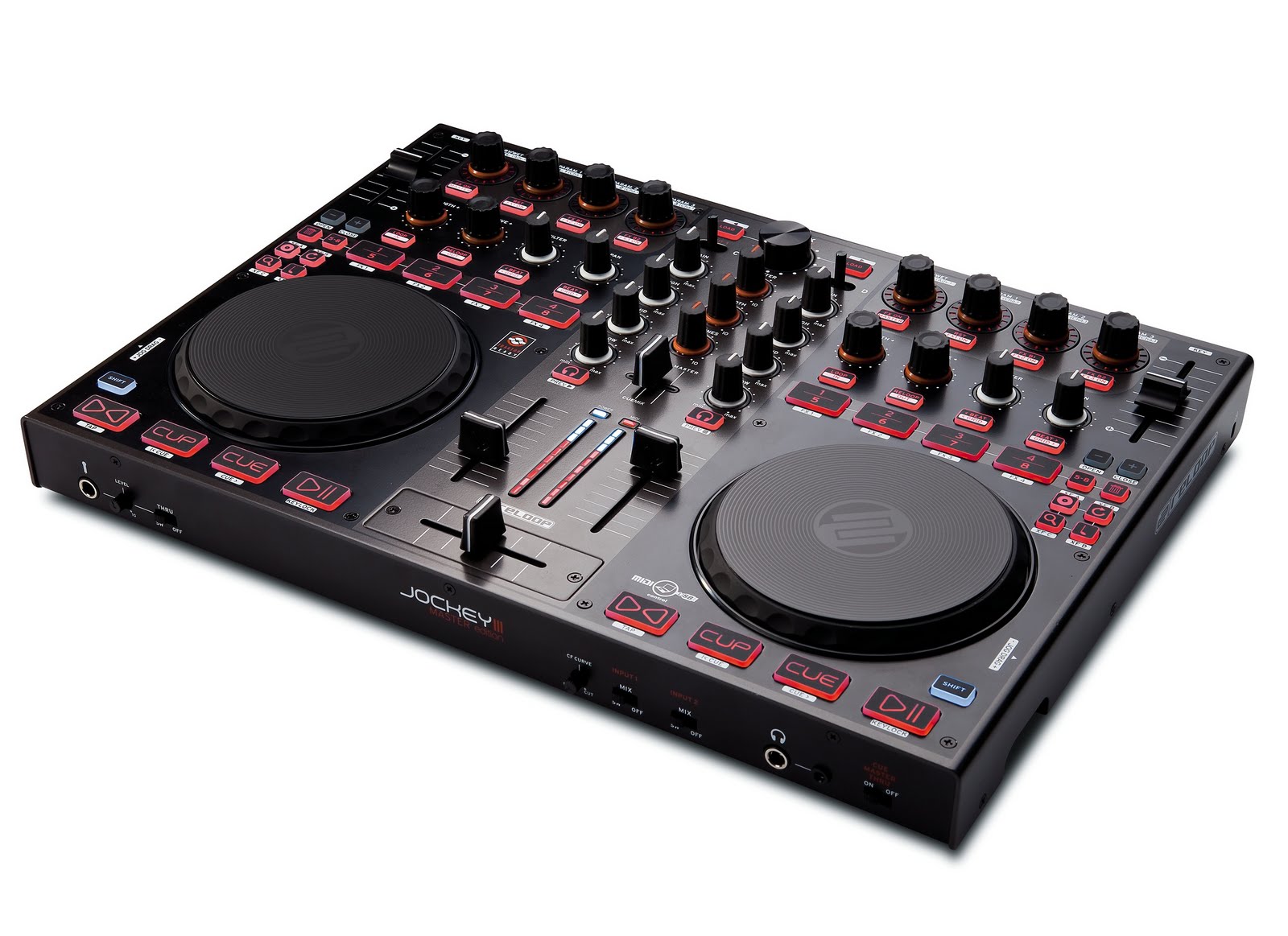
Today we have a special video for you, my first “Samurai Review” of the Reloop Jockey 3. DJTT looked at this controller at NAMM and gave it our “Best of Show Controller” Nammie award based on its looks, layout and feel. Now that we have the controller in the studio for extensive testing, does it still deserve that title? Hard to say- there are a few big bugs, but several great features as well. Continue reading for all the specs and check out my video review above!

Price: $699
Available: Soon!
Included software: Traktor LE 1 (Upgradable to 2)
External dimensions: 26.8 in (W) x 3.7 in (H) x 12.5 in (D)
Weight: 11lbs

THE GOOD

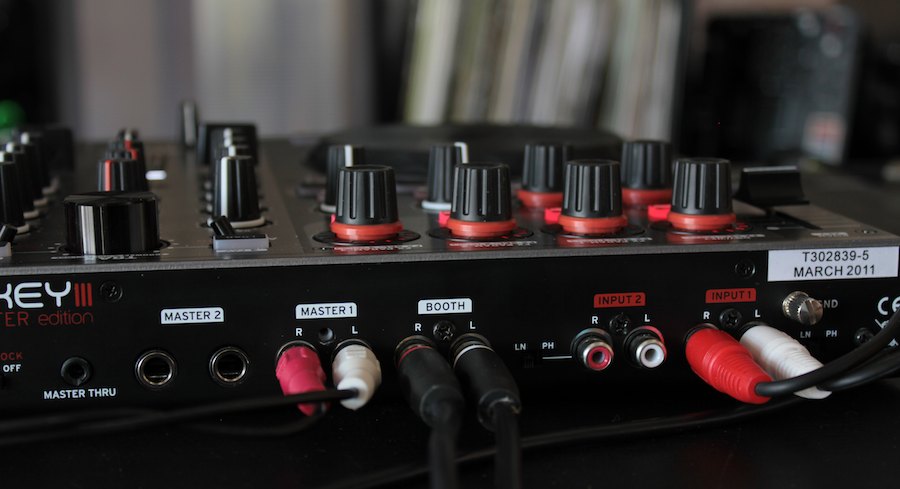
  • Multiple audio outs include master, booth and headphone
  • Nice grippy knobs
  • Ample controls for multiple cue points, effects, looping and more
  • Professional looking and well-built
  • Replaceable crossfader

THE BAD

  • Poor scratch performance with the jog wheels
  • Requires power supply
  • Heavy for its size
  • Requires an upgrade to Traktor Pro to use 4 decks (an extra $150)
  • Jog wheel sensitivity can cause accidental music stops

THE BOTTOM LINE

The jog wheel problems aside,  you have a well-constructed controller that does most of the things that the VCI-100 did and more.  There are no amazing built-in effects features, and the pre-labeled buttons make different mappings and overlays somewhat un-realistic. Then again, the back-lit, well-labeled buttons make them easy to see in the dark.  If this controller came in at around $499, I think it would make a really great first DJ option for those looking into Traktor LE.
For those that want a control solution for Traktor Pro 2, you will probably get a lot more value out of the S4, which will wind up being roughly the same price after software upgrades. I see this being great for those bedroom DJs that need a integrated sound card, 4 deck control, and a small portable size. In that range, this controller is certainly one of the best in its class, provided Reloop solves the jog wheel problems.

HANDS ON CONTROL

The jog wheels look and feel great. They are low profile with a large 5″ platter surface that turns smoothly with adjustable tension resistance. Unfortunately, they did not fare so well under testing. Scratching proved to be impossible and even cueing up a down-beat was equally un-wieldy (this was tested with Traktor Pro 2 and the official Jockey 3 mapping available at press time). Reloop told us:
“the mapping we have currently is not the 100% final one. For Traktor 2 we are still working with NI on a Hi-Res Implementation of our Jog Wheel (4096 Imp/Rot) – as this cannot be accomplished with a simple mapping.”
Jog wheels do take a lot of iteration to get right, so it is possible with some back and forth they could solve the issue. I am concerned, however, that there might be some hardware issues at play, as is the case with the touch sensitivity. One of the problems with scratching is how rapidly the platter responds to touch. As you saw in the video it is either way too sensitive (turning on without even touching) or not sensitive enough (slow release). Reloop commented:
” This technology is the same as on our CD-Players. The touch sensitivity of the Jog platters work with’body electricity’. Once the platter’s sensitivity is set to very high, the Jog’s can even detect this electric charge when your hand is very near - and not even touching the platter directly. You can try this out, for example try touching the platter with a plastic item and you will see that the Jogs will not respond. ”

SOLID CONNECTIONS


One solid aspect of the Jockey 3′s offerings is their I/O selection. Reloop appears to have listened to DJs on our site and others and provided several of the features folks have been screaming for. They include:
  • Discrete headphone, booth and master outputs
  • Dual analogue inputs that support line and phono sources
  • Microphone input that works without a computer connection
  • Switchable mixer channels that can mix external sources like a standard analogue mixer
These features make the Jockey 3 a well equipped little controller. The only downside is that they do all require external power from a wall wart, but given that this is one of your only power requirements, it is not the end of the world.

CONCLUSION

The Jockey 3 is a solid upgrade from Reloop’s previous efforts at controller manufacturing. While it is not yet perfect, they now have a serious contender for controllers in the two deck class and the market has a real alternative to the VCI-100 MK2 at a reasonable price.

วันจันทร์ที่ 28 มีนาคม พ.ศ. 2554

My First VJ outing with VDMX

My First VJ outing with VDMX

CIMG0257
So, on saturday I had my first public performance with VDMX. I was going from my Macbook Pro to an HD projector through a byzantine array of converters since there is no publicly available mini-display port to HDMI or component adapter. My signal was squashed to SD over RCA, but that was ok, since none of my source material was HD. Monoprice.com is supposed to have a Mini-display to HDMI adapter ready by the 15th of this month, so we'll see how that works out next time.

Overall I was pleased with VDMX. My setup had to run itself, because I was going to be busy playing keys with my band, and running around like a headless chicken for the rest of the show. I made three layers, one on top using an OpenGL add mode, two on bottom, transitioning back and forth using a quartz composition 'xerox' wipe. All the layers had clips cycling through them using a step sequencer. Since I had my computer in a balcony VJ booth, I was able to include a video input as a clip in my bin, and then angle the camera in my MacBook screen down at the audience so occasionally there would be a crowd shot projected, which seemed to give the audience a kick.

My visuals did get a little washed out due to so much simultaneous stuff going on at once with that OpenGL add mode, but that's something that shouldn't be too difficult to improve on next round. I may also try to add touchOSC controls from my iphone next time, although I am pretty content to just let the thing run itself so I don't have to worry about it. If I was vj'ing for another band I would probably add a midi controller and work that way.

I'll post my vdmx project file in a bit, as well as some video of the show when I track some down.

Digital Vs. Analog Mixing. Which is Better?

Digital Vs. Analog Mixing. Which is Better?

Software-VS-Hardware3
There has been a great debate taking place in forums around the digital DJ web. What is the best way to mix songs while DJing: externally on an analog mixer or inside your DJ software? Many DJs — myself included — have always assumed that mixing on an analog hardware mixer is the best option if you have the choice. To put that subjective assumption to the test, DJ TechTools interviewed numerous experts in the industry, including audio engineers, software developers and mixer manufacturers to get down to the bottom of this important question.

THE BIG QUESTION

Let’s assume you have DJ software, such as Traktor, that lets you mix internally or externally. When mixing internally, all of the audio signals from the decks are summed inside of the software and then sent out to the sound card as a single master output. All level controls, EQ and any distortion happens in the digital world before being converted to analog. When mixing externally, each deck’s audio is routed to separate outputs of your sound card. These outputs then connect to a DJ mixer, where the summing happens on the mixer in the analog world.
Before we dive into the audio quality question, each of these methods offers a few clear functional benefits.
mixer compare
At this stage, the contest is fairly evenly weighted with each option having clear pros and cons. The argument gets skewed when subjective experiences of audio quality start to get thrown in the mix. Statements like “external mixing sounds better” trump any pros/cons list, resulting in people making decisions based on assumptions rather than facts. So, to help us all understand the difference once and for all, we got in touch with the people who know this stuff inside and out.

THE ANALOG SIDE OF THE STORY

mixer-all
Our first stop in the analogue world is Rane, a Seattle based company known for making highly respected DJ mixers for more than 20 years. Rane makes analog mixers that sound good no matter how hard you push them, and digital mixers as well. That raises the question of how they get a TTM-57SL, which mixes all of the signals digitally on a DSP (just like software) to sound as good as their analog TTM-56. Steve Macatee, director of new product development, who has a lifetime of experience in designing quality DJ mixers, explains,
“Most people are used to the sound of CDs, which are 16 bits and 44Khz sample rate, but what we do in the TTM is far better than that. It’s a 24-bit world and 48khz sample rate, which increases the dynamic range and lowers the noise floor.”
A lower noise floor and wider dynamic range means that it’s much harder to distort a signal, providing the DJ with more head room. What happens when you do distort the audio though? Everyone is going to push the signal into the red at some point in the night, so isn’t that when analog starts to get more forgiving than digital?
Steve again corrected my assumptions,
“That’s not necessarily true. Because digital mixing technology has evolved over the past 20 years, you have digital converters that clip in very friendly ways. It really depends on the op amps and the circuitry you’re using. You can design an analog product where the audio clips the voltage rails and sounds like hell. [Editor's note: think Pioneer DJM-500.] You can also design an analog summing buss that doesn’t clip and sounds pretty nice. Whether analog or digital, you can do a good job or a bad job of it. What really matters is the quality design of the summing circuits and the dynamic range you get on the output.”
Okay, so the quality of circuits really depends on the designer, but don’t analog mixers offer certain soft limiting features that keep a DJ mix sounding good even when they are pushed into the red? Not quite:
“That’s a fun question, because in the analog world, a lot of our DJ products have outputs stages with little fixed limiters that are trying to keep people happy and not make the signal sound horribly distorted when the DJ turns the sound full on. When you do the same thing in the digital world, you have a plethora of possibilities, because you can do things in a much fancier way without taking up crucial board space (inside an analog mixer) because now what you have is a software problem. The only limit is the amount of memory your DSP has, which limits how fancy of a limiter you can create and how the audio circuits are built.
So in reality, if you’re comparing apples to apples, then digital mixing has the potential to be more flexible and forgiving than analog… if it’s designed properly. Since each product is going to have different characteristics and qualities depending on how well they are made, you really need to use your ears and put both software and analog mixers to the test before judging.

DIGITAL MIXING

Traktor’s Take
NIWe got Native Instrument’s take straight from none other than Stephan Schmitt, who created professional analog mixing consoles before founding NI.
“First of all, it is important to understand that audio summing circuits in a mixer or a similar hardware device are designed to combine electrical signals in the way of a very straightforward mathematical addition. In that sense, the internal mixing in Traktor – or any other properly designed audio software – is actually superior to a hardware mixer because it combines the audio signals in a mathematically precise way, and without introducing any noise.
One important aspect of digital summing is internal headroom, and this is where the audio quality can potentially suffer. Traktor overcomes this by using 32-bit floating point calculations, so headroom is practically unlimited (with 750 dB), and the mixer in the software can never produce unwanted clipping artifacts. This is not to be confused with the master output stage of the software that drives the audio interface — you need to take care not too overload this stage, and that’s why Traktor also offers an optional master limiter.
In a general you could call software mixing — or basic digital summing — “perfect” in terms of sound quality, and there is not even any DSP magic in the form of especially sophisticated algorithms required.
Obviously, certain analog mixers can color the sound in a way that some people find pleasant (though most mixers are much more likely to degrade the sound unless they have a really high-quality signal path). To cater for this aspect, Traktor offers the choice between a generic, “mathematically ideal” EQ on the one hand, and a selection of EQs emulated from actual high-quality hardware mixers on the other hand. These analog-modeling based EQs even color the sound in a subtle way when all bands are set at the zero position, in the same way as the analog counterparts.
When it comes to audio quality of DVS systems, the signal quality of the audio interface is a huge factor: the quality of the converters, signal-to-noise ratio and sheer output level. Also, software DSP functions such as digital effect algorithms and time-stretching do have a huge influence on sound quality, and require a lot of engineering effort and expertise. The difference in sophistication between a “standard” chorus or reverb algorithm and one that actually sounds good is enormous. Audio summing however is a very straightforward and comparably trivial part.
The Itch Side Story
itch
What about the Serato camp and its relatively new Itch product? How are they doing summing in the digital domain?
“The Itch mixer is designed to have enough headroom to effectively mix songs together without hitting full scale at the output.  Itch also has a master limiter on the main mix bus that will kick in if a DJ gains everything on full or is using high gain and lots of EQ, this limiter is to avoid clipping before being sent out to the sound card.  We have a feature on the setup screen called overdrive where you can adjust how much headroom is available in the mixer before the output limiter kicks in. By default it’s set to it’s safest setting, which offers the cleanest sound. Some people like more limiting and a crunchier sound, so want this turned up.  We also offer 6 or 12 DB boost on the EQs as an option, so a DJ can choose how they want it to sound.

STRAIGHT TALK

Equipment and software developers have a special expertise to be tapped, but their proclamations can also be biased toward the advantages of the particular gear they make. For some balance on this eternal debate, we turned to experts in the music technology education and journalism fields.
“Experience has indicated that analog summing is superior in creating separation and a better stereo image,” says Paul W. Hughes, a national manager at the SAE Institute chain of multimedia schools. “Tracks that have ‘a lot going on’ tend to lose definition when summing digitally in the box,” he continues. “Fundamentally, your [software] uses math and algorithms to blend the signals. That’s not how your ears process sound, so the more it has to sum, the more the sound will ‘feel’ as though it’s tanking out, losing punch, drive and energy. Pushing it louder will only result in distortion.”
George Petersen, the long-time editorial director of Mix Magazine and an active producer/engineer, says “Really, analog summing is the best way to go, but in most situations, the difference is pretty subtle.” Petersen doesn’t discourage anyone from mixing in the box, but he emphasizes the importance of a high-quality audio interface if you’re going to get the best sound using digital summing.
The quality of the digital-to-analog (D/A) conversion of your interface should be excellent, but so should the analog circuitry that amplifies the the sound after the D/A conversion. “Not only does the converter chip have it’s own sound,” Petersen says, “but the analog circuitry that’s built into a converter makes a huge difference on the sound, probably more so than the converter chip.”
Petersen cites cheap analog circuitry in an audio interface as contributing to the poor channel separation often associated with digital summing. While it’s not easy to verify the quality of the analog circuitry in an audio interface, looking at schematics can help. Petersen notes that low-cost interfaces will often follow the D/A converter chip with a stereo op amp, while his high-end gear follows the converter chip with two side-by-side mono amps on separate, non-touching circuit boards. “Are those cigarette pack-sized USB breakout boxes really treating the analog side of that signal properly?” Petersen asks. “Chance are usually no, they’re not.”

COMMON RESULTS

Everyone we asked had different opinions on the importance of summing circuits, but they all agreed on one important fact. The really critical part of sounding good when mixing with computers is the quality of the audio interface. If a sound card has poor D/A converters or poorly written drivers, then your software will sound bad. This is particularly important to remember as more and more DJs buy “all in one” controllers with built-in sound cards of sub-par quality. Wondering which sound card is right for you? Here are a few reviews of audio interfaces that we like, and another round up of “sound cards under $200″ is on the way.
Native Instruments Audio 8 Review
Echo AudioFire4 Reviewed
Further Complications.
As if this discussion were not already complicated enough, a really interesting fact popped up during the course of our investigation. Which operating system you use can actually play a part in the the latency and performance of audio coming out of your computer. It turns out that the Macintosh native audio drivers are much better suited for high-quality mixing than the native Windows drivers. Expect a full article on this subject in the coming weeks.

THE BOTTOM LINE

handsmixer
It’s safe to say that there is no real audio quality benefit to mixing with analog mixers instead of in the computer. In fact digital mixing offers greater flexibility in dealing with distortion and soft limiting. Assuming that you have good software, a proper audio interface and the common sense to set them both up properly, you should be able to get  a great-sounding mix either internally or externally. The real difference lies in each individual mixer and the quality of your audio interface.

Mix Techniques- Blending Swings

Mix Techniques- Blending Swings


Today we follow up last month’s successful article on dancing with a more in-depth look at mixing various types of rhythmic styles together. In the video above, I go into detail on recognizing swing differences and then five techniques to smoothly and effectively switch between different rhythmic styles in both house and hip-hop. The mapping used in the video is our Midi-Fighter deckalized layout for Traktor Pro and is available as a free download here.